
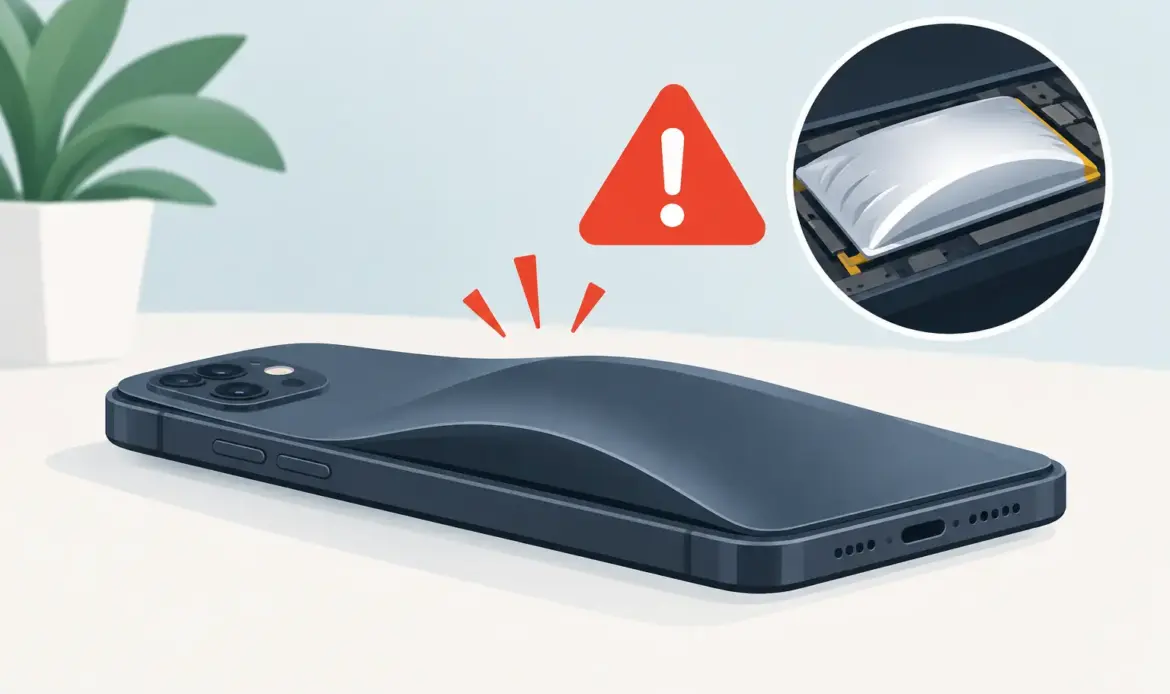
A phone that suddenly rocks on a table, has a screen lifting away from the frame, or feels unusually thick is sending a clear distress signal. Phone battery swelling is not normal wear and tear, and it is not a problem to press back into place and ignore. A swollen lithium-ion battery can damage your device, release irritating chemicals, and in rare cases become a fire hazard.
The good news: catching the problem early gives you the best chance to protect yourself and rescue the phone. The first priority is simple – stop using it, do not charge it, and have it handled by a qualified repair professional.
What phone battery swelling looks like
Phone battery swelling happens when a lithium-ion battery produces gas inside its sealed pouch. As pressure builds, the battery expands and pushes against the parts around it. On many phones, that means the display begins separating from the housing. On others, the back glass lifts, the frame bends, or the phone no longer sits flat.
Sometimes the signs are obvious. Other times, they are easy to mistake for a loose screen or worn case. Look for a display that is raised along one edge, gaps between the screen and frame, a back cover that will not sit flush, or buttons that suddenly feel misaligned. A phone may also get hotter than usual, shut down unexpectedly, or show rapidly declining battery life.
Do not rely on appearance alone. A phone can have a swollen battery even if the screen is only slightly lifted. If something looks or feels different, treat it seriously.
Why batteries swell in the first place
Lithium-ion batteries are built to store a lot of energy in a compact space. They do a remarkable job, but they also age. Chemical reactions inside the battery slowly change over hundreds of charge cycles. Heat, physical damage, manufacturing defects, and charging problems can speed up that aging and cause gas to form.
A swollen battery is not always the result of something you did wrong. It can happen to carefully owned devices, especially phones that have been used heavily for several years. Still, a few conditions make the risk more likely: frequent overheating, leaving a phone in a hot vehicle, using damaged or poor-quality charging equipment, repeated deep discharges, and prior water or drop damage.
Gaming, navigation, video calls, and demanding work apps can make a phone warm. That alone does not mean the battery is failing. The concern starts when heat is persistent, extreme, or paired with physical changes to the phone. A phone that is warm after an hour of use is different from a phone that becomes hot while sitting idle or charging.
What to do as soon as you notice it
Start by powering the phone off if you can do so without squeezing, bending, or forcing the device. Then disconnect it from any charger. Do not keep charging it to “see if it improves.” Charging adds energy to an already compromised battery and can make the situation worse.
Place the phone on a hard, nonflammable surface away from sunlight, paper, bedding, clothing, and anything else that could burn. A clear tile floor, concrete surface, or metal tray in a well-ventilated area is a better temporary spot than a nightstand or car console. Keep it out of reach of children and pets.
Next, arrange professional evaluation as soon as possible. A technician can safely open the device, remove the damaged battery, inspect the display and frame for pressure damage, and install a high-quality replacement when repair makes sense. For Metro Detroit device owners, Phone-Medics can diagnose the issue and help bring a phone back to life without treating a safety concern like a simple cosmetic repair.
If the phone is smoking, hissing, leaking, rapidly heating up, or has caught fire, move away from it and call 911. Do not pick it up, put it in your pocket, or try to carry it outside. Your safety comes first.
What not to do with a swollen battery
A swollen battery needs careful handling, not a home fix. The pressure inside the pouch makes even ordinary repair attempts risky. Avoid these common mistakes:
- Do not puncture, cut, crush, bend, or squeeze the battery or the phone.
- Do not press the screen or back cover down and attempt to glue it shut.
- Do not charge the device, use wireless charging, or connect it to a computer for power.
- Do not place it in a freezer, microwave, oven, or sealed container.
- Do not throw the phone or battery in household trash or a curbside recycling bin.
It can be tempting to remove a lifted screen to save a repair bill. That is where a manageable battery replacement can turn into a damaged display, torn cable, chemical exposure, or a dangerous puncture. Modern phones are tightly packed, and battery adhesive is often extremely strong. Precision tools and experience matter.
Can you still save the data on the phone?
Often, yes. If the phone still powers on and is stable enough to operate briefly, back up essential data only if doing so does not require charging or extended use. Prioritize contacts, recent photos, authentication codes, and work files. Use a wireless backup if it is already set up, but do not keep the phone running for hours just to complete a backup.
If the device is powered off, badly distorted, hot, or unable to stay on, leave recovery to the repair process. A battery replacement may restore access without affecting your storage. Whether data can be recovered depends on the model, the degree of damage, and whether the battery expansion affected the screen, motherboard, or internal cables.
This is one reason prompt action helps. The longer a swollen battery pushes against delicate components, the more likely it is to crack the screen, damage the enclosure, or compromise internal connections.
Is repair worth it, or should you replace the phone?
There is no one answer. A battery replacement is often a smart, cost-effective rescue for a phone that otherwise works well, receives current security updates, and meets your daily needs. If the swelling was caught early, the repair may be limited to the battery and adhesive work.
Replacement may make more sense when the phone is already very old, has major water damage, a broken display, charging failure, or costly frame damage. Some swollen batteries can crack the screen from inside, and that changes the repair calculation. A trustworthy technician should inspect the full device, explain the condition plainly, and give you a realistic quote rather than pushing a repair that does not serve you.
Quality matters here. A cheap battery is not automatically a bargain if it has poor capacity, unreliable protection circuitry, or a short service life. Ask about the quality of the replacement part and the repair warranty. The goal is not merely to make the phone turn on again. It is to restore safe, dependable daily use.
How to reduce the risk after repair
No battery lasts forever, but a few habits can reduce heat and stress over time. Use a reliable charger and cable, especially if your original cable is frayed, loose, or intermittently charging. Avoid charging under pillows, blankets, or thick clothing where heat cannot escape. Take the phone out of direct sun and never leave it baking in a parked vehicle.
You do not need to obsess over keeping the charge at one perfect percentage. Modern phones manage charging well. What matters more is avoiding repeated extreme heat and addressing unusual behavior early. If a repaired or newer phone starts overheating, losing charge dramatically, or separating at the screen again, stop using it and have it checked.
A swollen phone battery is one of those problems where waiting can turn a straightforward rescue into a bigger repair. Trust the warning signs, keep the device disconnected from power, and let skilled hands take it from there.